Introduction
Welcome to the developer documentation of Bitlibs. This page provides a quick introduction to what Bitlibs is and explains why and when you should use it.
What is Bitlibs?
Bitlibs provides a modern data layer for your javascript applications
Bitlibs is a data layer library for modern javascript applications. It provides modular abstractions for working with domain Datamodels, Datasets, Forms, Contexts and more. Bitlibs gives you a powerful set of tools which you can utilise to rapidly develop high quality, modern javascript applications, independent of any view layer framework you might use.
The data layer
The data layer exists between the view layer (UI) and the back-end (API), taking care of transforming and translating data between them. It is where you perform operations like fetching data from an API to present in the UI, validating input data from the UI and posting it to an API, modifying this data and working with arbitrary collections of such data. This functionality is used everywhere throughout modern javascript applications, yet there is a lack of libraries that provide powerful abstractions for this functionality. Because of this developers are forced to work with raw JSON data instead of proper abstractions thereof.
Layered back-end web-applications also have a data layer, better known as the service or business logic layer. For the back-end data layer there are plenty of libraries providing abstractions like Object-Relational Mappers (ORMs) and Serializers. Bitlibs provides the same type of abstractions to front-end developers.
Why use Bitlibs?
Complexity is shifting from the back-end to highly interactive front-ends
Currently there is a shift from traditional server-sided web applications towards highly interactive front-ends that are largely decoupled from the back-end API they interface with. This means that it is becoming increasingly important to have a modern, generic high-quality front-end application codebase which you can keep improving and expanding upon.
There exist a number of great view layer frameworks like React, Vue and Angular which help manage your view code and its associated state. However, there is a lack of libraries that help you write clean and modular data layers. Most javascript applications do not even have a dedicated data layer: data layer code is often intertwined with view layer code, making it hard to re-use and error-prone. Bitlibs aims to solve that, saving you development time and increasing code quality.
Use cases
Common use cases for bitlibs are, amongst others:
- Defining what your domain models look like, including their fields, validation logic and custom behaviour
- Creating new instances of models using forms in the UI, validating them and saving them to a persistent store
- Fetching a particular instance of a model from a persistent store, editing it using forms in the UI, validating it and saving it back to the persistent store
- Defining datasets and the operations they support, including filtering, searching, sorting, pagination etcetera
- Loading collections of model instances from a persistent store into a dataset
- Performing network requests using a high-level API, with support for service adapters to communicate with various APIs, and for middleware which can be applied to all requests
Comparison
To illustrate what using bitlibs means for your application architecture compare the following two diagrams.
Architecture without bitlibs
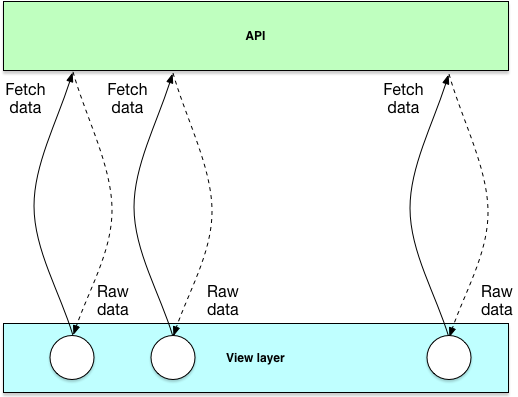
This is an architecture without bitlibs. Here the view layer typically contains code which fetches data from an API and works directly with the raw data returned by the API to update the view. Everywhere where the view needs data from the API, the fetch code is embedded into the view layer. This is like typing raw SQL in server-side applications and working with the raw result arrays instead of using an Object-Relational Mapper to abstract this for you.
Architecture with bitlibs
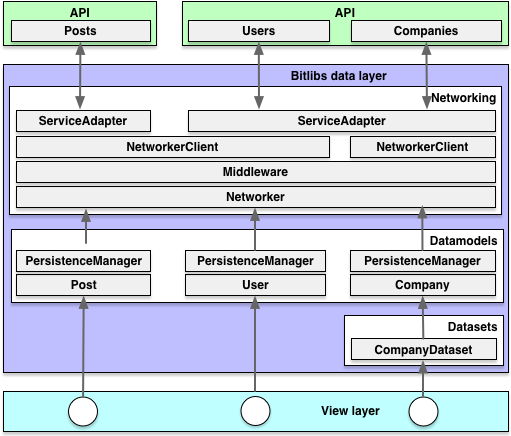
This is what an architecture with bitlibs looks like. The view works with instances of domain models (Datamodels) you define yourself, which contain fields (attributes) of certain types and have certain operations that can be performed on them. Models are validated before saving them to some persistent store like an API, and working with collections of Datamodels is just as easy using the Datasets module. The networking module provides an abstraction layer for various types of APIs, ensuring your application code does not change when using a different API.